Neruna Cloud for teams using Neruna Desktop
Manage your team in one place. Your data stays with you.
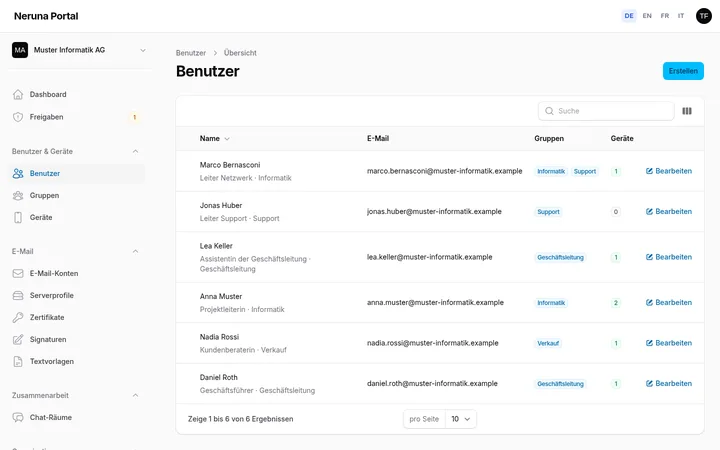
The portal for your organisation: maintain people and groups, connect workstations securely, provide signatures, text templates, mail accounts and S/MIME certificates for everyone – and chat as a team if you like.
- Hosted in Switzerland
- No credit card
- Ready in two minutes
- 0emails, events or contacts with us
- Zero Knowledgefor certificate keys, account passwords and backups
- CHoperated in Switzerland, Swiss data protection law
- MPL 2.0open-source client, verifiable
01 What Neruna Cloud is
Management in the cloud. Your data where it belongs.
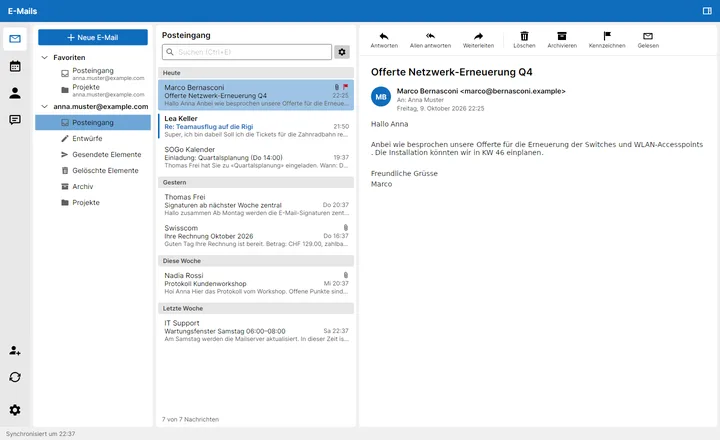
Neruna Cloud hands out configuration to Neruna Desktop, the email, calendar and contacts program your staff use. The content still flows directly between the program and your mail server – or Microsoft 365.
Get to know Neruna Desktop on neruna.org02 Features
Everything IT needs for Neruna Desktop
- People & devicesProfiles, connection codes, device overview – block lost devices at once.
- Pair phonesOn their own desktop with a QR code – you set how many per person.
- Approvals & notificationsCheck and approve new devices in one place – and a mail when something is waiting.
- Central signaturesConsistent for everyone, automatically with current profile data.
- Text templatesStandard replies and notes, inserted with a click or a shortcut.
- Mail accounts & server profilesSet up and assign mailboxes centrally, aliases included.
- S/MIME certificatesUpload once, assign people, approve per device – zero knowledge.
- Team chatRooms per group, private messages, retention as you decide.
- Audit log & two-factorWho changed what when – and signing in only with a second factor.
- Personal backupSettings encrypted in the vault – new computer, restore, done.
03 How it works
Ready in three steps
No server, no installation on site – just the portal and Neruna Desktop.
- Create your organisation
Sign up, confirm your email, enter your company name. The trial starts right away.
- Add your people
Create staff with their profiles and generate a connection code for each person.
- Connect Neruna Desktop
In Neruna, enter code and PIN under Settings → Cloud – done. The device appears in the portal.
04 Security and privacy
Neruna manages settings – not your data
Your email, calendars and contacts stay on your own mail server – or in Microsoft 365. Neruna Cloud only knows what management requires.
Security in detail- Hosted in SwitzerlandNeruna Cloud runs in data centres in Switzerland and is subject to Swiss data protection law.
- No mail, events or contactsNeruna Cloud stores no mail, events or contacts – only organisation, profiles and configuration.
- The chat: the only exception, and optionalIf your organisation uses the chat, messages are kept unencrypted in Switzerland, only as long as you decide (1 day to 3 months). Switched off in the portal, nothing is stored and everything existing is deleted.
- Certificates: zero knowledgePrivate keys are encrypted in the browser and decrypted only on approved devices – the server can never read them.
- Accounts and backups: zero knowledgeMail account passwords and personal backups are encrypted in the browser or the app – the server can never read them. Server settings are signed, so nobody can redirect passwords.
05 Neruna Desktop
The client: Neruna Desktop – free and open source.
Your staff work in Neruna Desktop: email, calendar and contacts in one program, as familiar as the office. What the program does in detail is on neruna.org.
Ready for your first workstation?
30 days free, up to 5 people – no credit card.